
|
A good object-oriented design should be able to catch design problems before any code is written. There are many tools a designer may use: UML, patterns, inheritance, polymorphism, encapsulation… Where do you start? What are the steps? How do you identify design flaws? The dice game described by Craig Larman in Applying UML and Patterns begins with a use case: Play a Game. The actor is a player. The player rolls the dice. If the sum of the rolls is equal to seven, the player wins; otherwise, the player loses. Abbreviating the design process, the class and collaboration diagrams for this use case are shown in Figures 1 and 2. The Java code is shown in Solution 1. The Java code was created by mapping the class and collaboration diagrams to code using a few basic translation rules. The purpose for creating the Java code is to highlight potential design flaws in a way familiar to students with little or no training in object orientation. Is there anything wrong with this design? If there is, at which step of this process could the problem have been found? 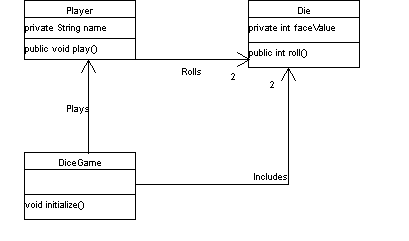 Figure 1: Class Diagram - Larman
 Figure 2: Collaboration Diagram - Larman
class Player {

    public boolean play ( Die dice[] ) {
        int roll_1 = dice[0].roll();
        int roll_2 = dice[1].roll();

        // rule: if the sum of the rolls equals 7, player wins
        return ( (roll_1 + roll_2) == 7 ) ? true : false;
    }
}
Java Solution 1: Larman's Design
One of the foremost design guidelines of object orientation is encapsulation, which is defined in Larman's glossary as "a mechanism used to hide the data, internal structure, and implementation details of an object". What we noticed when walking through this example is that the rules for the game appear to be implemented in the Player class. Specifically, it would appear from the collaboration diagram that the rule for scoring the game is implemented by the play method of the Player class. This is apparent from the fact that, when the player rolls the dice, he retrieves the face values of each die. Is this the best place to encapsulate the rules? What if:
Also, notice that the class diagram shows that the DiceGame includes the dice. How does the player get visibility to the dice so that he may roll them? We went and added the dice as a parameter to the play method to provide this visibility. And notice that the feedback from the game is not really defined. Should the Player feed the result back to the game to inform it that he won? What's to keep the Player from bending the rules? How else could the player play the game? If we want to hide the implementation details of the game, where do the rules belong? Attempting to get a little better encapsulation to solve the problems listed above, we put the play method on the DiceGame. In this way the game can encapsulate the rules. See the result in Figures 3 and 4 and Solution 2 below. 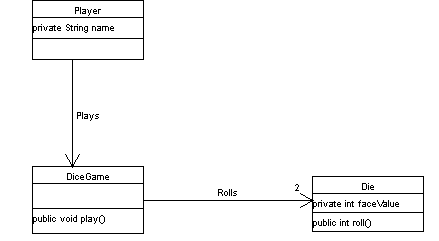 Figure 3: Class Diagram - OBD
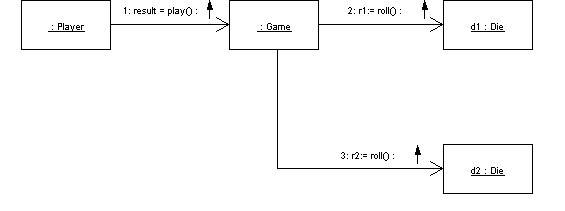 Figure 4: Collaboration Diagram - OBD
class DiceGame {

    private Die dice[2];
    private Display display;

    public void play ( ) {
        int roll_1 = dice[0].roll();
        int roll_2 = dice[1].roll();

        // rule: if the sum of the rolls equals 7, player wins
        if ( (roll_1 + roll_2) == 7 )
            display.message ( "You won!" );
        else
            display.message ( "You lost. Try again." );
    }
}
Java Solution 2: OBD Design
The new design of the DiceGame has been simplified because:
To summarize, we have provided a glimpse of the process behind validating an object-oriented design by using established design principles. Our purpose wasn't necessarily to find the best design. In fact, the design process as a whole is highly iterative. Further assumptions need to be tested against the full set of requirements before the final design is 'ready'. However, what we wanted to accomplish by this discussion is to highlight how to make the object-oriented design process relevant and meaningful to students new to the process.
|
|
|
Copyright © 1999 Objects by Design, Inc. All rights reserved.